

- HOME
- Edge AI Station α
- EDGEMATRIX Kaleidoscope
Edge AI Station α AI Application
Transforming human movement into data usable on site.
Improving daily operations, safety management,
and advancing operational efficiency
EDGEMATRIX Kaleidoscope is a versatile AI-powered people analytics application that can count people within a designated area, track foot traffic, detect unauthorized entry, measure dwell time, and identify prolonged loitering—all within a single platform. By eliminating the need to install and manage separate AI applications for different use cases, it helps reduce costs and simplifies system design. The latest version (v2.2.3) includes privacy-enhancing masking functionality, as well as loitering alerts and visual indicators that change based on loitering duration. The application supports data visualization, notifications, and integration with external systems across a wide range of environments, including retail facilities, event venues, hospitals, schools, offices, condominium common areas, and facility management zones.
|App Features|
Supports both full-body detection and
head detection
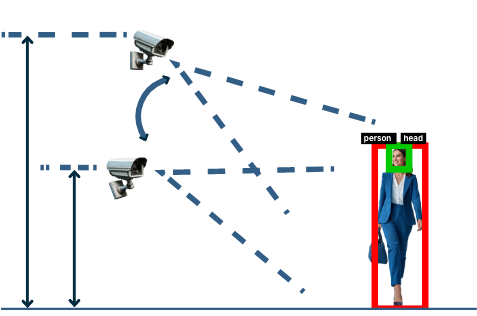
Since it can detect people in two locations, you can select the optimal detection method based on the camera's field of view and mounting height.
3 types of mask settings
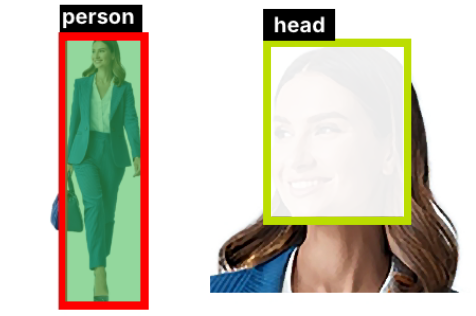
Automatically blurs the head, the entire body, or both, to help protect privacy during video reviews
*This is based on AI detection results, so there may be cases where detection is missed and the information is not masked. 100% anonymization is not guaranteed.Five functions in one app
Supports five people detection functions: counting the number of people within a designated area, counting the number of people passing by, intrusion detection, measuring dwell time, and detecting prolonged loitering.
|App Intro Video|
Applied to Kaleidoscope.(※Under development image.)
|Usage Scenes|
Number of people entering and leaving / Number of people staying in an area
Installed at entrances and exits of commercial facilities, stores, and event venues to measure the number of people entering and leaving (line cross counting function). Or, set up a detection area using video images of places where people gather, such as hospital waiting rooms, and measure the number of people staying in that detection area (in-area headcount function). By developing post-processing using Node-RED, external system integration is possible, and measurement data can be sent to building management systems to control air conditioning, lighting, elevators, and so on.
Commercial Facilities
Event Venues

Hospitals, schools, etc.

Offices / Apartments
*Node-RED is a visual programming development tool for interconnecting hardware devices, APIs, and online services.
|App Overview|
In addition to the “full body”, it detects and measures the “human head” and implements the following three functions
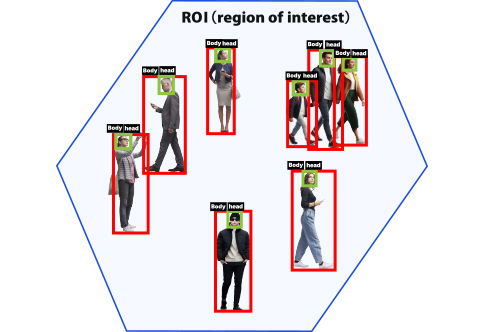
Counting the number of people in an area
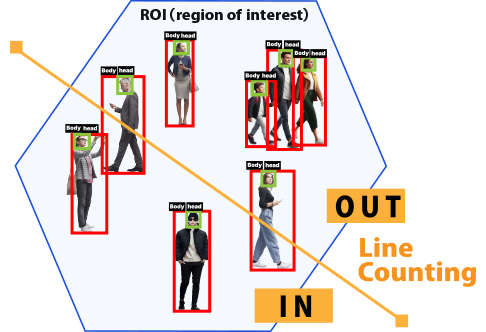
Counting the number of people crossing the line
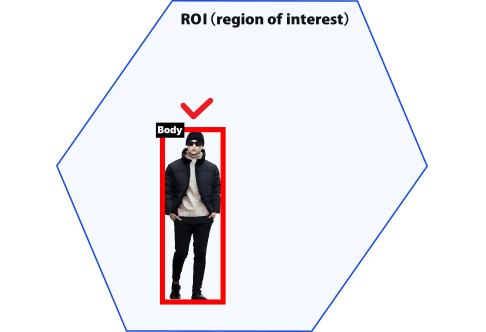
Intrusion detection in the area
With Node-RED, a standard feature of AI Station, inference results from
AI applications can be processed and sent formatted for integration with external systems.
Generic Node-RED Flow (Post-Processing) Overview
Because AI Station is expected to be deployed frequently in on-premises environments and private networks without Internet connectivity, providing a web application for visualization is optional for AI Station-compatible applications (AIPs). This differs from existing Store Applications (EAPs), where a visualization web application is typically included.
For customers deploying AI Station in environments with Internet connectivity, it is also possible to use Node-RED for post-processing and transmit inference results to your company's website or cloud service, where they can be visualized through a web application. This architecture can be easily extended to support email notifications, signal tower (Patlite) integration, external API integration, and dashboard visualization.
By providing a visualization web application, you can make your AI application more appealing to a broader range of customers and expand its potential use cases. Therefore, we encourage you to consider developing and offering a visualization web application alongside your AI application.
Grafana
*We plan to use a general-purpose visualization system that can be built with OSS, consisting of Grafana + InfluxDB.
*We plan to provide a manual on how to build a general-purpose visualization system and a general-purpose Node-RED flow for sending visualization data to InfluxDB.
*By using Grafana, it is also possible to send alert emails according to thresholds.
|Functional Details|
Detection Methods
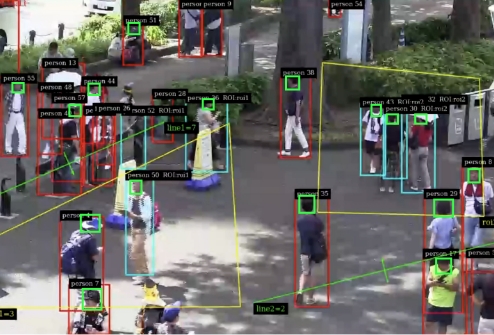
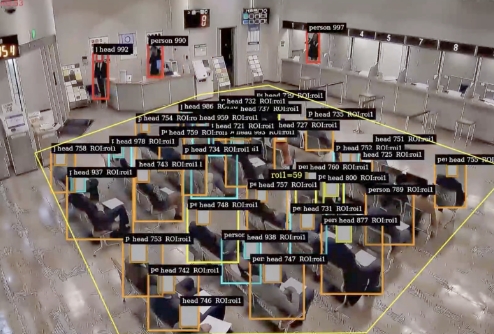
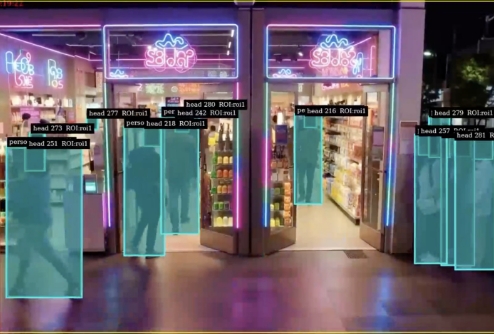
AI Station counts the number of people within user-defined ROIs (Regions of Interest) and the number of people crossing designated counting lines. Person detection supports both full-body ("person") and head ("head") detection, allowing you to select the most suitable method based on the camera installation location and viewing angle. The application supports a wide range of camera perspectives and installation environments*1. While viewing the live preview screen, users can intuitively adjust detection areas and counting methods to achieve optimal results. Optional masking functionality is also available to help protect privacy. Multiple ROIs and counting lines can be configured within a single video stream, enabling simultaneous and independent counting of occupancy and passage traffic. In addition, prolonged stays can be detected in multiple stages, with configurable system notifications and on-screen visual alerts*2.
*1: Camera Viewing Angles
Head Detection ("head"): Ideal for overhead or bird's-eye camera views and environments where people frequently overlap or crowd together.
Full-Body Detection ("person"): Best suited for side-angle or oblique camera views.
*2: Prolonged Loitering Detection and Alerts
Prolonged loitering is detected in configurable stages once the specified dwell-time threshold is exceeded. Level 1 triggers a Node-RED notification, while Levels 2 and 3 provide visual alerts through bounding box color changes. The re-notification interval after a Level 1 alert can be configured in minutes.
App Provider Company
Company Name:EDGEMATRIX Inc.
About Us:We contribute to society through the development of “Video Edge AI” infrastructure technology. Our mission is to implement “Video Edge AI” in society.
Edge AI Station brochure
Download PDF ▶
Edge AI Station α
Appliance Products
Edge AI Station α ▶- KaleidoscopeMultifunctional human detection
- Smart TrafficPassing vehicles count
- Smart ParkingParking lot congestion detection
-
AI++ Congestion Detection
/ AI++ Passing People Counter -
Passing people count
+
Counting people in an area - Attribute Estimation + Passing people count
- Fire (flame and smoke) detection
- Vehicle license plate detection